Example of WDf usage with multi data segments and multi-processing
author: Elena Cuoco
Cuoco et al., Wavelet-Based Classification of Transient Signals for Gravitational Wave Detectors DO - 10.23919/EUSIPCO.2018.8553393
Please note that many packages, as graphic one or logging are not part of WDF docker, but you can install them locally or use your preferred ones
[1]:
# import libraries
import time
import os
from pytsa.tsa import *
from pytsa.tsa import SeqView_double_t as SV
from wdf.config.Parameters import *
from wdf.processes.wdfUnitDSWorker import *
from wdf.processes.wdfUnitWorker import *
import logging
import coloredlogs
#select level of logging
coloredlogs.install(isatty=True)

logging.basicConfig(level=logging.DEBUG)
[2]:
new_json_config_file = True    # set to True if you want to create new Configuration

if new_json_config_file==True:
    configuration = {
  "window":1024,
  "overlap":768,
  "threshold": 0.2,
  "file": "./data/test.gwf",
  "channel": "H1:GWOSC-4KHZ_R1_STRAIN",
  "run":"offLine",
  "len":10.0,
  "gps":1167559608,
  "segments":[[1167559008,1167559408],[1167559408,1167560008],[1167560008,1167560308]],
  #"segments":[[1167559608,1167560008] ],
  "outdir": "local_dir/",
  "dir":"local_dir/",
  "ID":"WDF_test",
  "ARorder": 1000,
  "learn": 200,
  "preWhite":2,
  "ResamplingFactor":2,
  "LowFrequencyCut":12,
  "FilterOrder":6,
  "nproc":4
}

    filejson = os.path.join(os.getcwd(),"inputWDF.json")
    file_json = open(filejson, "w+")
    json.dump(configuration, file_json)
    file_json.close()

logging.info("read parameters from JSON file")
par = Parameters()

filejson = "inputWDF.json"
try:
    par.load(filejson)
except IOError:
    logging.error("Cannot find resource file " + filejson)
    quit()

par.print()
2023-03-29 14:18:51 hal2022 root[4076457] INFO read parameters from JSON file
{   'ARorder': 1000,
    'FilterOrder': 6,
    'ID': 'WDF_test',
    'LowFrequencyCut': 12,
    'ResamplingFactor': 2,
    'channel': 'H1:GWOSC-4KHZ_R1_STRAIN',
    'dir': 'local_dir/',
    'file': './data/test.gwf',
    'gps': 1167559608,
    'learn': 200,
    'len': 10.0,
    'nproc': 4,
    'outdir': 'local_dir/',
    'overlap': 768,
    'preWhite': 2,
    'run': 'offLine',
    'segments': [   [1167559008, 1167559408],
                    [1167559408, 1167560008],
                    [1167560008, 1167560308]],
    'threshold': 0.2,
    'window': 1024}
It is important that you define correctly the parameters in the configuration files. WDf is a pipeline which performs a series of steps before producing triggers for transient signals in your data. Here it is the list of parameters you can fix in your configuration file.
- ARorder = order of AutoRegressive model for whitening
- ID = identification numer for your run
- ResamplingFactor = the ratio between the original sampling frequency and the downsampled one
- channel = the name of the channel in you .gwf o .ffl file you want to analyze
- dir = where to find the parameters
- file = file to be anlyzed
- gps = the starting time for for analysis (overwritten by values in segments)
- learn = the length in seconds of the data you will use to estimate AR parameters
- len = the time window in second of data loaded in you loop
- nproc = the number of processors you will use
- outdir = where you want to save the results
- overlap = overlapping number between 2 consecutives windows for WDF analysis
- prewhite = the number of iter to pre-heat the whitening procedure (leave as it is)
- run = additional tag for your data run
- segments = 1 or more segments defined as [start time, end time] where you will run WDF, usually 1 segment/processor
- threshold = the minimum value for WDF snr to identify a trigger
- window = the analyzing window in point for WDF. It should be a power of 2
If you set the par.dir or par.outdir as relative path, we need to give the absolute path.
[3]:
import os
par.dir=os.getcwd()+'/'+par.dir
par.outdir=os.getcwd()+'/'+par.outdir
Load information for sampling frequency
[4]:
strInfo = FrameIChannel(par.file, par.channel, 1.0, par.gps)
Info = SV()
strInfo.GetData(Info)
par.sampling = int(1.0 / Info.GetSampling())
if par.ResamplingFactor!=None:
    par.resampling = int(par.sampling / par.ResamplingFactor)
    logging.info("sampling frequency= %s, resampled frequency= %s" %(par.sampling, par.resampling))
del Info, strInfo
2023-03-29 14:18:52 hal2022 root[4076457] INFO sampling frequency= 4096, resampled frequency= 2048
Launch WDF runs
The fullPrint option is important to save information about the WDF triggers
- fullPrint = 0 –> you save only the metaparameters for the triggers
- fullPrint = 1 –> you save the metaparameters and the wavelet coefficients for that trigger
- fullPrint = 2 –> you save the metaparameters and the reconstructed waveform for that trigger
- fullPring = 3 –> you save the metaparameters, the wavelet coefficients and the reconstructed waveform for that trigger in the ‘window’ time (window/sampling frequency)
[5]:
import multiprocessing as mp
print("Number of processors: ", mp.cpu_count())
pool = mp.Pool(par.nproc)

wdf=wdfUnitDSWorker(par,fullPrint=2)
pool.map(wdf.segmentProcess, [segment for segment in par.segments])
pool.close()
Number of processors: 32
2023-03-29 14:18:52 hal2022 root[4076576] INFO Analyzing segment: 1167560008-1167560308 for channel H1:GWOSC-4KHZ_R1_STRAIN downsampled at 2048Hz
2023-03-29 14:18:52 hal2022 root[4076575] INFO Analyzing segment: 1167559408-1167560008 for channel H1:GWOSC-4KHZ_R1_STRAIN downsampled at 2048Hz
2023-03-29 14:18:52 hal2022 root[4076574] INFO Analyzing segment: 1167559008-1167559408 for channel H1:GWOSC-4KHZ_R1_STRAIN downsampled at 2048Hz
2023-03-29 14:18:52 hal2022 root[4076575] INFO Start AR parameter estimation
2023-03-29 14:18:52 hal2022 root[4076574] INFO Start AR parameter estimation
2023-03-29 14:18:52 hal2022 root[4076576] INFO Start AR parameter estimation
2023-03-29 14:19:27 hal2022 root[4076575] INFO Estimated sigma= 4.0675451444151897e-22
2023-03-29 14:19:27 hal2022 root[4076576] INFO Estimated sigma= 4.0062637269449494e-22
2023-03-29 14:19:27 hal2022 root[4076574] INFO Estimated sigma= 4.0023147527036696e-22
2023-03-29 14:19:32 hal2022 root[4076575] INFO Starting detection loop
2023-03-29 14:19:32 hal2022 root[4076576] INFO Starting detection loop
2023-03-29 14:19:32 hal2022 root[4076574] INFO Starting detection loop
2023-03-29 14:22:25 hal2022 root[4076576] INFO analyzed 300 seconds in 212.9326889514923 seconds
2023-03-29 14:23:22 hal2022 root[4076574] INFO analyzed 400 seconds in 270.102082490921 seconds
2023-03-29 14:25:12 hal2022 root[4076575] INFO analyzed 600 seconds in 379.5118489265442 seconds
In the output dir with ‘run’ tag you will find the estimated AR coefficients, and a .csv files containing the trigger lists
Let’s have a look at the results
[6]:
import pandas as pd

import glob

dirName = par.outdir # use your path
all_files = glob.glob(os.path.join(dirName, "*","*.csv"))     # advisable to use os.path.join as this makes concatenation OS independent
df_from_each_file = (pd.read_csv(f) for f in all_files)
triggers  = pd.concat(df_from_each_file, ignore_index=True)
[7]:
triggers.shape
[7]:
(5810, 1035)
[8]:
import matplotlib.pylab as plt
pd.set_option('display.max_rows', 999)
pd.set_option('max_colwidth',100)
pd.set_option('display.float_format', lambda x: '%.3f' % x)
import numpy as np

%matplotlib inline
# Alternatives include bmh, fivethirtyeight, ggplot,
# dark_background, seaborn-deep, etc
plt.style.use('ggplot')
plt.rcParams['font.monospace'] = 'Ubuntu Mono'
plt.rcParams['font.size'] = 10
plt.rcParams['axes.labelsize'] = 10
plt.rcParams['axes.labelweight'] = 'bold'
plt.rcParams['xtick.labelsize'] = 8
plt.rcParams['ytick.labelsize'] = 8
plt.rcParams['legend.fontsize'] = 10
plt.rcParams['figure.titlesize'] = 12
plt.rcParams['figure.figsize'] = (14, 10)

colors = np.array([x for x in 'bgrcmykbgrcmykbgrcmykbgrcmyk'])
colors = np.hstack([colors] * 20)
plt.figure(0)
print (triggers.shape)

triggers.head(10)
(5810, 1035)
[8]:
| gps | gpsPeak | duration | EnWDF | snrMean | snrPeak | freqMin | freqMean | freqMax | freqPeak | ... | rw1014 | rw1015 | rw1016 | rw1017 | rw1018 | rw1019 | rw1020 | rw1021 | rw1022 | rw1023 | |
|---|---|---|---|---|---|---|---|---|---|---|---|---|---|---|---|---|---|---|---|---|---|
| 0 | 1167559009.000 | 1167559009.421 | 0.453 | 0.290 | 0.256 | 1.786 | 62.000 | 148.346 | 250.000 | 136.000 | ... | 0.000 | -0.000 | -0.000 | -0.000 | -0.000 | -0.000 | -0.000 | -0.000 | -0.000 | 0.000 |
| 1 | 1167559009.125 | 1167559009.421 | 0.500 | 0.331 | 0.275 | 1.809 | 62.000 | 155.500 | 274.000 | 116.000 | ... | -0.000 | -0.000 | -0.000 | 0.000 | 0.000 | 0.000 | 0.000 | 0.000 | 0.000 | 0.000 |
| 2 | 1167559009.250 | 1167559009.421 | 0.473 | 0.275 | 0.248 | 1.734 | 58.000 | 153.423 | 266.000 | 116.000 | ... | -0.000 | 0.000 | 0.000 | 0.000 | 0.000 | 0.000 | 0.000 | -0.000 | -0.000 | 0.000 |
| 3 | 1167559009.375 | 1167559009.421 | 0.477 | 0.235 | 0.220 | 1.628 | 48.000 | 154.846 | 272.000 | 140.000 | ... | 0.000 | 0.000 | 0.000 | 0.000 | 0.000 | -0.000 | -0.000 | -0.000 | -0.000 | -0.000 |
| 4 | 1167559011.375 | 1167559011.782 | 0.500 | 0.305 | 0.219 | 1.788 | 88.000 | 173.769 | 282.000 | 112.000 | ... | 0.000 | 0.000 | 0.000 | 0.000 | 0.000 | -0.000 | -0.000 | -0.000 | -0.000 | -0.000 |
| 5 | 1167559011.500 | 1167559011.782 | 0.404 | 0.311 | 0.224 | 1.782 | 86.000 | 169.269 | 280.000 | 124.000 | ... | -0.000 | -0.000 | 0.000 | 0.000 | 0.000 | 0.000 | 0.000 | 0.000 | 0.000 | 0.000 |
| 6 | 1167559011.625 | 1167559011.782 | 0.500 | 0.350 | 0.255 | 1.769 | 78.000 | 170.000 | 302.000 | 122.000 | ... | -0.000 | -0.000 | -0.000 | 0.000 | 0.000 | 0.000 | 0.000 | 0.000 | 0.000 | 0.000 |
| 7 | 1167559011.750 | 1167559011.782 | 0.473 | 0.369 | 0.278 | 1.794 | 70.000 | 168.385 | 298.000 | 138.000 | ... | 0.000 | 0.000 | 0.000 | 0.000 | 0.000 | 0.000 | 0.000 | 0.000 | -0.000 | -0.000 |
| 8 | 1167559011.875 | 1167559012.096 | 0.461 | 0.252 | 0.221 | 1.293 | 56.000 | 164.808 | 318.000 | 156.000 | ... | 0.000 | 0.000 | 0.000 | 0.000 | 0.000 | -0.000 | -0.000 | -0.000 | -0.000 | -0.000 |
| 9 | 1167559012.000 | 1167559012.096 | 0.458 | 0.246 | 0.219 | 1.269 | 54.000 | 174.000 | 356.000 | 156.000 | ... | -0.000 | -0.000 | -0.000 | -0.000 | -0.000 | -0.000 | -0.000 | 0.000 | 0.000 | 0.000 |
10 rows × 1035 columns
<Figure size 1400x1000 with 0 Axes>
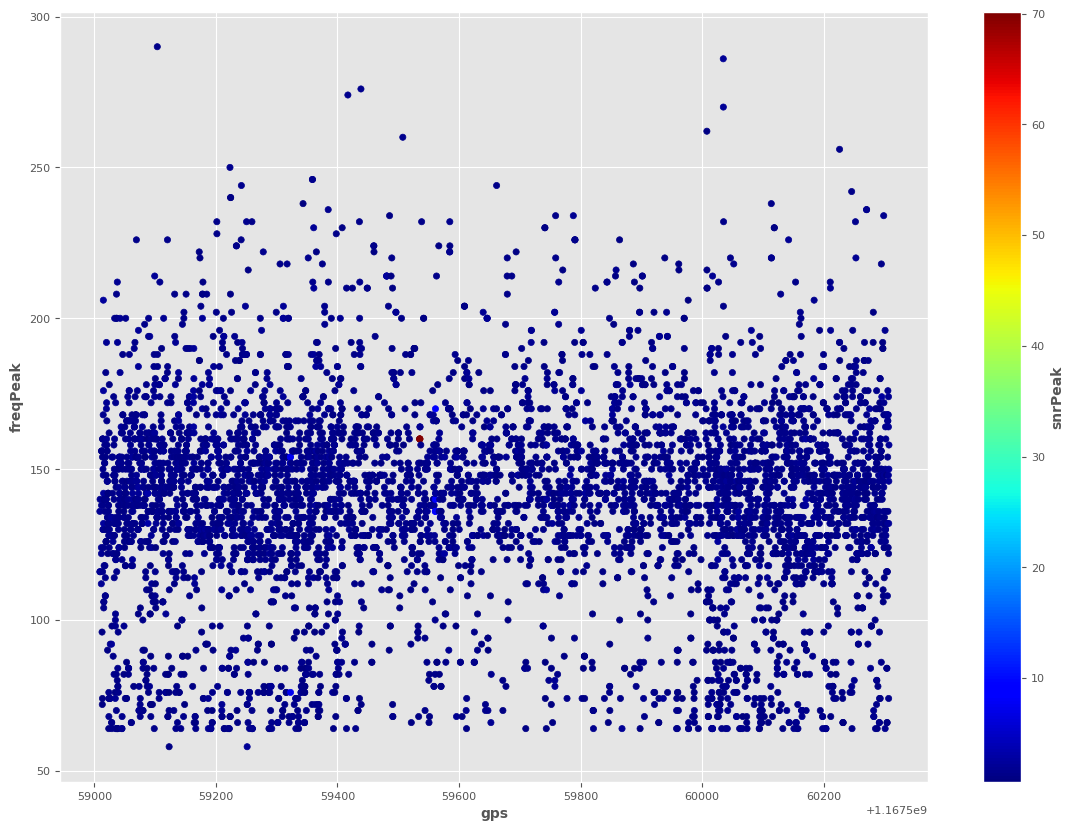
[9]:
ax2 = triggers.plot.scatter(x='gps',
                      y='freqPeak',
                      c='snrPeak',
                      colormap='jet')
[10]:
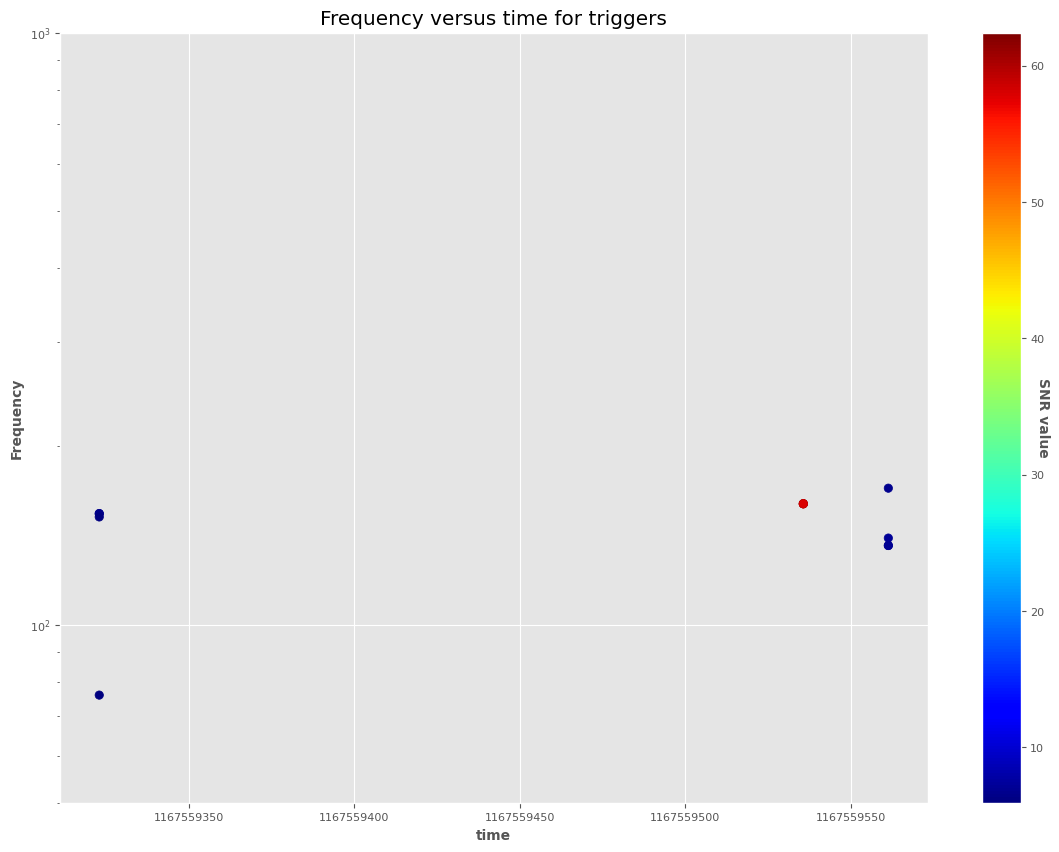
df=triggers[triggers['snrPeak']>4]
[11]:
plt.figure(0)
print (df.shape)

from matplotlib.ticker import FormatStrFormatter

sc = plt.scatter(df.gpsPeak,
                 df.freqPeak,c=df.EnWDF, cmap='jet')

# legend
cbar = plt.colorbar(sc)
cbar.ax.set_yticklabels(['5','10', '20', '30', '40', '50', '60','>60'])
cbar.set_label('SNR value', rotation=270)

plt.ylim(50, 1000)
plt.yscale('log')
plt.gca().get_xaxis().get_major_formatter().set_useOffset(False)
plt.gca().get_xaxis().get_major_formatter().set_scientific(False)
plt.xlabel("time")
plt.ylabel("Frequency")
plt.title("Frequency versus time for triggers")
(12, 1035)
/tmp/ipykernel_4076457/2239143324.py:11: UserWarning: FixedFormatter should only be used together with FixedLocator
  cbar.ax.set_yticklabels(['5','10', '20', '30', '40', '50', '60','>60'])
[11]:
Text(0.5, 1.0, 'Frequency versus time for triggers')
[12]:
df=triggers.sort_values('EnWDF', ascending=False)
[13]:
df.head(10)
[13]:
| gps | gpsPeak | duration | EnWDF | snrMean | snrPeak | freqMin | freqMean | freqMax | freqPeak | ... | rw1014 | rw1015 | rw1016 | rw1017 | rw1018 | rw1019 | rw1020 | rw1021 | rw1022 | rw1023 | |
|---|---|---|---|---|---|---|---|---|---|---|---|---|---|---|---|---|---|---|---|---|---|
| 4255 | 1167559535.375 | 1167559535.639 | 0.019 | 6.242 | 4.661 | 70.169 | 76.000 | 152.577 | 262.000 | 160.000 | ... | -0.000 | -0.000 | -0.000 | -0.000 | -0.000 | -0.000 | -0.000 | -0.000 | -0.000 | -0.000 |
| 4254 | 1167559535.250 | 1167559535.639 | 0.019 | 6.219 | 4.659 | 70.154 | 74.000 | 146.962 | 260.000 | 160.000 | ... | 0.000 | 0.000 | 0.000 | 0.000 | 0.000 | 0.000 | 0.000 | 0.000 | 0.000 | 0.000 |
| 4256 | 1167559535.500 | 1167559535.639 | 0.019 | 6.170 | 4.658 | 70.118 | 76.000 | 150.308 | 262.000 | 160.000 | ... | -0.000 | -0.000 | -0.000 | -0.000 | -0.000 | 0.000 | 0.000 | 0.000 | 0.000 | 0.000 |
| 4257 | 1167559535.625 | 1167559535.639 | 0.019 | 5.798 | 4.624 | 69.640 | 80.000 | 152.192 | 264.000 | 160.000 | ... | 0.000 | 0.000 | 0.000 | 0.000 | 0.000 | 0.000 | 0.000 | -0.000 | 0.000 | 0.000 |
| 4341 | 1167559560.875 | 1167559561.331 | 0.276 | 0.706 | 0.529 | 8.874 | 58.000 | 156.846 | 276.000 | 140.000 | ... | 0.000 | 0.000 | 0.000 | 0.000 | 0.000 | 0.000 | 0.000 | -0.000 | -0.000 | -0.000 |
| 4343 | 1167559561.125 | 1167559561.331 | 0.107 | 0.687 | 0.517 | 8.830 | 58.000 | 152.923 | 278.000 | 136.000 | ... | 0.000 | 0.000 | 0.000 | 0.000 | 0.000 | 0.000 | 0.000 | 0.000 | 0.000 | -0.000 |
| 1673 | 1167559322.500 | 1167559322.928 | 0.497 | 0.685 | 0.474 | 7.734 | 54.000 | 146.731 | 240.000 | 154.000 | ... | 0.000 | 0.000 | 0.000 | 0.000 | 0.000 | -0.000 | -0.000 | -0.000 | 0.000 | 0.000 |
| 4344 | 1167559561.250 | 1167559561.331 | 0.018 | 0.679 | 0.506 | 8.830 | 68.000 | 149.731 | 222.000 | 170.000 | ... | 0.000 | 0.000 | 0.000 | 0.000 | 0.000 | 0.000 | 0.000 | -0.000 | -0.000 | -0.000 |
| 4342 | 1167559561.000 | 1167559561.331 | 0.276 | 0.675 | 0.522 | 8.674 | 58.000 | 155.308 | 276.000 | 136.000 | ... | 0.000 | 0.000 | 0.000 | 0.000 | 0.000 | 0.000 | -0.000 | -0.000 | -0.000 | -0.000 |
| 1674 | 1167559322.625 | 1167559322.928 | 0.411 | 0.648 | 0.462 | 7.642 | 62.000 | 150.154 | 240.000 | 154.000 | ... | 0.000 | 0.000 | 0.000 | 0.000 | 0.000 | 0.000 | -0.000 | -0.000 | -0.000 | -0.000 |
10 rows × 1035 columns
[14]:
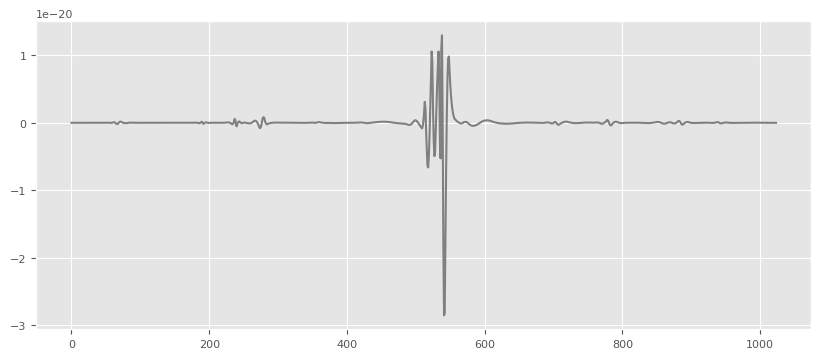
wav=np.array(triggers.loc[triggers['EnWDF'].idxmax()][11:].values)
[15]:
import matplotlib
import matplotlib.pyplot as plt
matplotlib.rcParams['agg.path.chunksize']=10000
%matplotlib inline

plt.figure(figsize=(10,4)),
plt.plot(wav,'gray',label='h'),
[15]:
([<matplotlib.lines.Line2D at 0x7fc742d42310>],)
[16]:
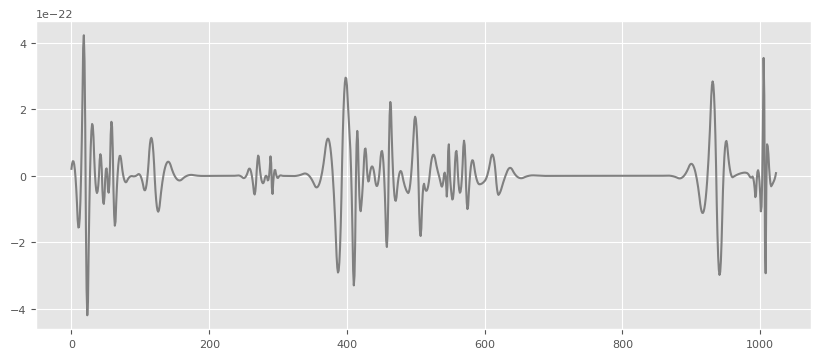
wav=np.array(triggers.loc[11][11:].values)

plt.figure(figsize=(10,4)),
plt.plot(wav,'gray',label='h'),
[16]:
([<matplotlib.lines.Line2D at 0x7fc742d950d0>],)
[ ]: